Input dan output primitif
Versi paket
Kode di halaman ini dikembangkan menggunakan persyaratan berikut. Kami merekomendasikan menggunakan versi ini atau yang lebih baru.
qiskit[all]~=2.5.2
Halaman ini memberikan gambaran umum tentang input dan output dari primitif Qiskit SDK. Dengan primitif-primitif ini kamu bisa menggunakan struktur data yang dikenal sebagai Primitive Unified Bloc (PUB) untuk mendefinisikan beban kerja yang divektorisasi secara efisien. PUB ini merupakan unit kerja fundamental untuk eksekusi beban kerja. PUB digunakan sebagai input untuk metode run() pada primitif Sampler dan Estimator, yang mengeksekusi beban kerja yang telah didefinisikan sebagai sebuah job. Kemudian, setelah job selesai, hasilnya dikembalikan dalam format yang bergantung pada PUB yang digunakan serta opsi apa pun yang ditentukan.
Gambaran umum PUB
Saat memanggil metode run() dari sebuah primitif, argumen utama yang diperlukan adalah list berisi satu atau lebih tuple — satu untuk setiap Circuit yang dieksekusi oleh primitif. Setiap tuple ini dianggap sebagai PUB, dan elemen yang diperlukan dalam setiap tuple bergantung pada primitif yang digunakan. Data yang diberikan ke tuple ini juga bisa disusun dalam berbagai bentuk untuk memberikan fleksibilitas dalam beban kerja melalui broadcasting — aturannya dijelaskan di bagian berikut.
Estimator PUB
Untuk primitif Estimator, format PUB harus berisi paling banyak empat nilai:
- Satu
QuantumCircuit, yang mungkin berisi satu atau lebih objekParameter - Daftar satu atau lebih observable, yang menentukan nilai ekspektasi yang akan diestimasi, disusun dalam array (misalnya, satu observable direpresentasikan sebagai array 0-d, daftar observable sebagai array 1-d, dan seterusnya). Data bisa dalam salah satu format
ObservablesArrayLikesepertiPauli,SparsePauliOp,PauliList, ataustr.catatanJika kamu memiliki dua observable yang saling komuting di PUB berbeda tetapi dengan Circuit yang sama, keduanya tidak akan diestimasi menggunakan pengukuran yang sama. Setiap PUB merepresentasikan basis pengukuran yang berbeda, sehingga pengukuran terpisah diperlukan untuk setiap PUB. Untuk memastikan observable yang komuting diestimasi menggunakan pengukuran yang sama, keduanya harus dikelompokkan dalam PUB yang sama.
- Kumpulan nilai parameter untuk diikat ke Circuit. Ini bisa ditentukan sebagai objek tunggal mirip array di mana indeks terakhir mengacu pada objek
ParameterCircuit, atau dihilangkan (atau setara, diatur keNone) jika Circuit tidak memiliki objekParameter. - (Opsional) presisi target untuk nilai ekspektasi yang akan diestimasi
Sampler PUB
Untuk primitif Sampler, format tuple PUB berisi paling banyak tiga nilai:
- Satu
QuantumCircuit, yang mungkin berisi satu atau lebih objekParameterCatatan: Circuit ini juga harus menyertakan instruksi pengukuran untuk setiap qubit yang akan di-sampling. - Kumpulan nilai parameter untuk diikat ke Circuit (hanya diperlukan jika ada objek
Parameteryang harus diikat saat runtime) - (Opsional) jumlah shot untuk mengukur Circuit
Kode berikut menunjukkan contoh sekumpulan input yang divektorisasi untuk primitif Estimator.
# Added by doQumentation — required packages for this notebook
!pip install -q numpy qiskit
from qiskit.circuit import (
    Parameter,
    QuantumCircuit,
    ClassicalRegister,
    QuantumRegister,
)
from qiskit.transpiler import generate_preset_pass_manager
from qiskit.quantum_info import SparsePauliOp
from qiskit.primitives.containers import BitArray
from qiskit.primitives import StatevectorEstimator

import numpy as np

# Define a circuit with two parameters.
circuit = QuantumCircuit(2)
circuit.h(0)
circuit.cx(0, 1)
circuit.ry(Parameter("a"), 0)
circuit.rz(Parameter("b"), 0)
circuit.cx(0, 1)
circuit.h(0)

# Transpile the circuit without providing a backend
pm = generate_preset_pass_manager(optimization_level=1)
transpiled_circuit = pm.run(circuit)
layout = transpiled_circuit.layout

# Now define a sweep over parameter values, the last axis of dimension 2 is
# for the two parameters "a" and "b"
params = np.vstack(
    [
        np.linspace(-np.pi, np.pi, 10),
        np.linspace(-4 * np.pi, 4 * np.pi, 10),
    ]
).T

# Define three observables. The inner length-1 lists cause this array of
# observables to have shape (3, 1), rather than shape (3,) if they were
# omitted.
observables = [
    [SparsePauliOp(["XX", "IY"], [0.5, 0.5])],
    [SparsePauliOp("XX")],
    [SparsePauliOp("IY")],
]
# Apply the same layout as the transpiled circuit.
observables = [
    [observable.apply_layout(layout) for observable in observable_set]
    for observable_set in observables
]

# Estimate the expectation value for all 300 combinations of observables
# and parameter values, where the pub result will have shape (3, 100).
#
# This shape is due to our array of parameter bindings having shape
# (100, 2), combined with our array of observables having shape (3, 1).
estimator = StatevectorEstimator()
estimator_pub = (transpiled_circuit, observables, params)

# Run the transpiled circuit
# using the set of parameters and observables.

job = estimator.run([estimator_pub])
result = job.result()
Aturan broadcasting
PUB menggabungkan elemen dari beberapa array (observable dan nilai parameter) dengan mengikuti aturan broadcasting yang sama seperti NumPy. Bagian ini merangkum aturan-aturan tersebut secara singkat. Untuk penjelasan lebih rinci, lihat dokumentasi aturan broadcasting NumPy.
Aturan:
-
Array input tidak perlu memiliki jumlah dimensi yang sama.
-
Array hasil akan memiliki jumlah dimensi yang sama dengan array input yang memiliki dimensi terbesar.
-
Ukuran setiap dimensi adalah ukuran terbesar dari dimensi yang bersesuaian.
-
Dimensi yang hilang diasumsikan berukuran satu.
-
-
Perbandingan bentuk dimulai dari dimensi paling kanan dan berlanjut ke kiri.
-
Dua dimensi kompatibel jika ukurannya sama atau salah satunya adalah 1.
Contoh pasangan array yang bisa di-broadcast:
A1     (1d array):      1
A2     (2d array):  3 x 5
Result (2d array):  3 x 5

A1     (3d array):  11 x 2 x 7
A2     (3d array):  11 x 1 x 7
Result (3d array):  11 x 2 x 7
Contoh pasangan array yang tidak bisa di-broadcast:
A1     (1d array):  5
A2     (1d array):  3

A1     (2d array):      2 x 1
# The following would work if the middle dimension were 2,
# instead of 5.
A2     (3d array):  6 x 5 x 4
Estimator mengembalikan satu estimasi nilai ekspektasi untuk setiap elemen dari bentuk yang di-broadcast.
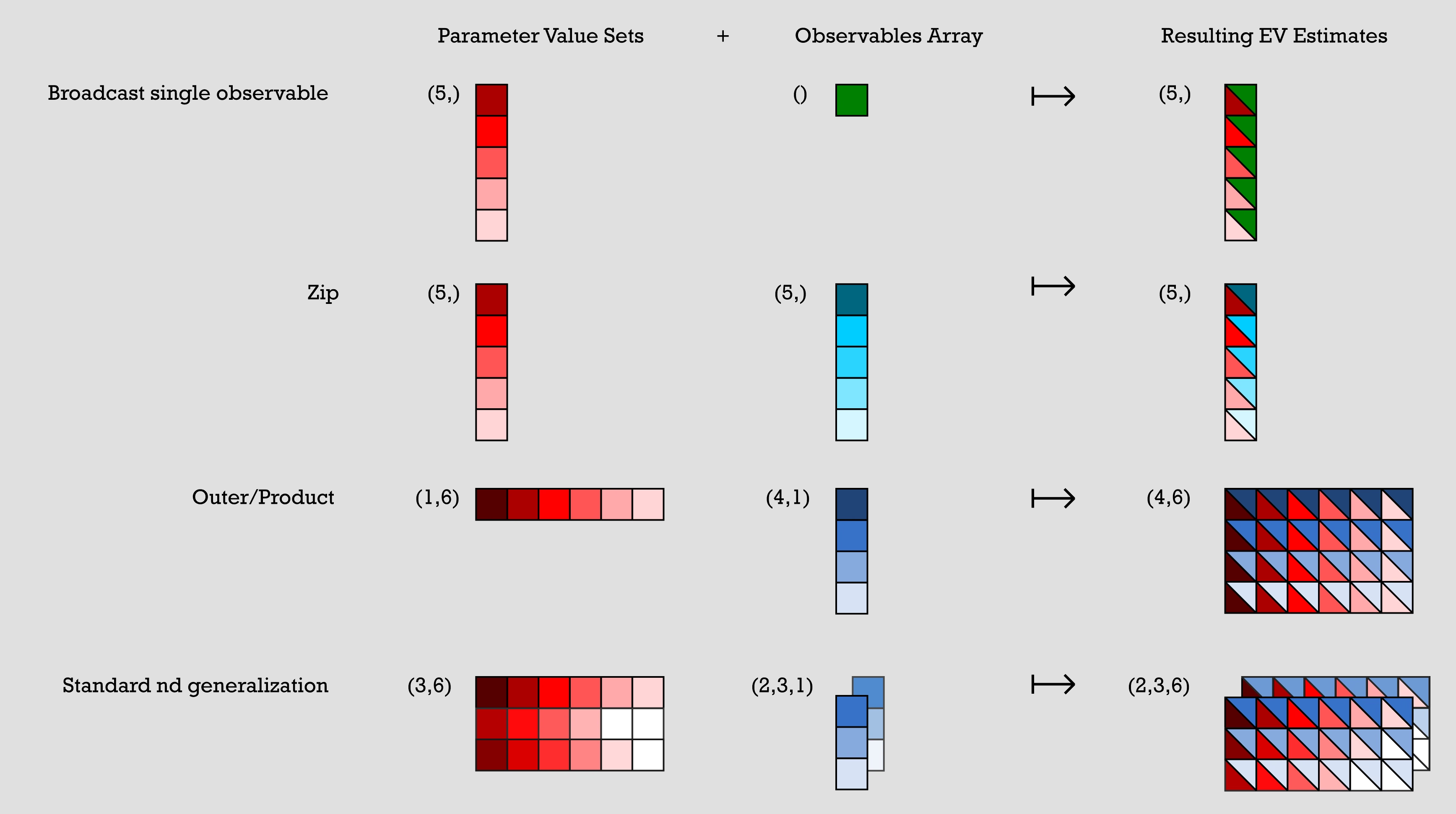
Berikut beberapa contoh pola umum yang diekspresikan dalam bentuk broadcasting array. Representasi visualnya ditampilkan pada gambar berikut:
Sekumpulan nilai parameter direpresentasikan oleh array n x m, dan array observable direpresentasikan oleh satu atau lebih array satu kolom. Untuk setiap contoh dalam kode sebelumnya, sekumpulan nilai parameter digabungkan dengan array observable-nya untuk menghasilkan estimasi nilai ekspektasi.
-
Contoh 1: (broadcast observable tunggal) memiliki sekumpulan nilai parameter berupa array 5x1 dan array observable 1x1. Satu item dalam array observable digabungkan dengan setiap item dalam sekumpulan nilai parameter untuk menghasilkan array 5x1 tunggal di mana setiap item merupakan kombinasi dari item asli dalam sekumpulan nilai parameter dengan item dalam array observable.
-
Contoh 2: (zip) memiliki sekumpulan nilai parameter 5x1 dan array observable 5x1. Outputnya adalah array 5x1 di mana setiap item merupakan kombinasi dari item ke-n dalam sekumpulan nilai parameter dengan item ke-n dalam array observable.
-
Contoh 3: (outer/product) memiliki sekumpulan nilai parameter 1x6 dan array observable 4x1. Kombinasinya menghasilkan array 4x6 yang dibuat dengan menggabungkan setiap item dalam sekumpulan nilai parameter dengan setiap item dalam array observable, sehingga setiap nilai parameter menjadi seluruh kolom dalam output.
-
Contoh 4: (Generalisasi nd standar) memiliki array sekumpulan nilai parameter 3x6 dan dua array observable 3x1. Keduanya digabungkan untuk menghasilkan dua array output 3x6 dengan cara yang mirip dengan contoh sebelumnya.
# Broadcast single observable
parameter_values = np.random.uniform(size=(5,))  # shape (5,)
observables = SparsePauliOp("ZZZ")  # shape ()
# >> pub result has shape (5,)

# Zip
parameter_values = np.random.uniform(size=(5,))  # shape (5,)
observables = [
    SparsePauliOp(pauli) for pauli in ["III", "XXX", "YYY", "ZZZ", "XYZ"]
]  # shape (5,)
# >> pub result has shape (5,)

# Outer/Product
parameter_values = np.random.uniform(size=(1, 6))  # shape (1, 6)
observables = [
    [SparsePauliOp(pauli)] for pauli in ["III", "XXX", "YYY", "ZZZ"]
]  # shape (4, 1)
# >> pub result has shape (4, 6)

# Standard nd generalization
parameter_values = np.random.uniform(size=(3, 6))  # shape (3, 6)
observables = [
    [
        [SparsePauliOp(["XII"])],
        [SparsePauliOp(["IXI"])],
        [SparsePauliOp(["IIX"])],
    ],
    [
        [SparsePauliOp(["ZII"])],
        [SparsePauliOp(["IZI"])],
        [SparsePauliOp(["IIZ"])],
    ],
]  # shape (2, 3, 1)
# >> pub result has shape (2, 3, 6)
Setiap SparsePauliOp dihitung sebagai satu elemen dalam konteks ini, terlepas dari jumlah Pauli yang terkandung dalam SparsePauliOp. Jadi, untuk keperluan aturan broadcasting ini, semua elemen berikut memiliki bentuk yang sama:
a = SparsePauliOp("Z") # shape ()
b = SparsePauliOp("IIIIZXYIZ") # shape ()
c = SparsePauliOp.from_list(["XX", "XY", "IZ"]) # shape ()
Daftar operator berikut, meski setara dalam hal informasi yang terkandung, memiliki bentuk yang berbeda:
list1 = SparsePauliOp.from_list(["XX", "XY", "IZ"])
# list1 has shape ()
list2 = [SparsePauliOp("XX"), SparsePauliOp("XY"), SparsePauliOp("IZ")]
# list2 has shape (3, )
Gambaran umum output primitif
Setelah satu atau lebih PUB dikirim ke QPU untuk dieksekusi dan sebuah job berhasil selesai, data dikembalikan sebagai objek container PrimitiveResult. PrimitiveResult berisi daftar iterable objek PubResult yang berisi hasil eksekusi untuk setiap PUB. Misalnya, job yang dikirim dengan 20 PUB akan mengembalikan objek PrimitiveResult yang berisi daftar 20 PubResults, satu untuk setiap PUB.
Setiap objek PubResult ini memiliki atribut data dan atribut metadata opsional. Atribut data adalah DataBin yang dikustomisasi dan berisi estimasi nilai ekspektasi dalam kasus Estimator, atau sampel dari output Circuit dalam kasus Sampler.
Atribut data mungkin juga menyertakan informasi spesifik implementasi lainnya seperti deviasi standar. Atribut metadata dapat berisi informasi spesifik implementasi tambahan tentang eksekusi PUB terkait.
Berikut adalah garis besar visual dari struktur data PrimitiveResult:
- Output Estimator
- Output Sampler
└── PrimitiveResult
    ├── PubResult[0]
    │   ├── metadata
    │   └── data  ## In the form of a DataBin object,
    |       |     ## which includes data such as the following:
    │       ├── evs
    │       │   └── List of estimated expectation values in the shape
    |       |         specified by the first pub
    │       └── stds
    │           └── List of calculated standard deviations in the
    |                 same shape as above
    ├── PubResult[1]
    |   ├── metadata
    |   └── data  ## In the form of a DataBin object,
    |       |     ## which includes data such as the following:
    |       ├── evs
    |       │   └── List of estimated expectation values in the shape
    |       |        specified by the second pub
    |       └── stds
    |           └── List of calculated standard deviations in the
    |                same shape as above
    ├── ...
    ├── ...
    └── ...
Yang di atas adalah contoh data yang mungkin dikembalikan. Data aktual yang dikembalikan bergantung pada implementasinya.
└── PrimitiveResult
    ├── PubResult[0]
    │   ├── metadata
    │   └── data  ## In the form of a DataBin object
    │       ├── NAME_OF_CLASSICAL_REGISTER
    │       │   └── BitArray of count data for first PUB (default is 'meas')
    |       |
    │       └── NAME_OF_ANOTHER_CLASSICAL_REGISTER
    │           └── BitArray of count data (exists only if more than one
    |                 ClassicalRegister was specified in the circuit)
    ├── PubResult[1]
    |   ├── metadata
    |   └── data  ## In the form of a DataBin object
    |       └── NAME_OF_CLASSICAL_REGISTER
    |           └── BitArray of count data for second PUB
    ├── ...
    ├── ...
    └── ...
Output Estimator
Seperti yang telah disebutkan sebelumnya, data yang dikembalikan dalam PubResult untuk primitif Estimator bergantung pada implementasinya. Misalnya, data tersebut mungkin berisi array nilai ekspektasi (PubResult.data.evs) dan standar deviasi terkait (PubResult.data.stds).
Potongan kode di bawah ini menjelaskan format PrimitiveResult (dan PubResult terkait) untuk job yang dibuat di atas.
print(
    f"The result of the submitted job had {len(result)} PUB and "
    f"has a value:\n {result}\n"
)
print(
    f"The associated PubResult of this job has the following data bins:"
    f"\n {result[0].data}\n"
)
print(f"And this DataBin has attributes: {result[0].data.keys()}")
print(
    "Recall that this shape is due to our array of parameter binding sets "
    "having shape (100, 2) -- where 2 is the number of parameters in the circuit -- "
    "combined with our array of observables having shape (3, 1)."
)

print(
    f"The expectation values measured from this PUB are: \n{result[0].data.evs}"
)
The result of the submitted job had 1 PUB and has a value:
 PrimitiveResult([PubResult(data=DataBin(evs=np.ndarray(<shape=(3, 10), dtype=float64>), stds=np.ndarray(<shape=(3, 10), dtype=float64>), shape=(3, 10)), metadata={'target_precision': 0.0, 'circuit_metadata': {}})], metadata={'version': 2})

The associated PubResult of this job has the following data bins:
 DataBin(evs=np.ndarray(<shape=(3, 10), dtype=float64>), stds=np.ndarray(<shape=(3, 10), dtype=float64>), shape=(3, 10))

And this DataBin has attributes: dict_keys(['evs', 'stds'])
Recall that this shape is due to our array of parameter binding sets having shape (100, 2) -- where 2 is the number of parameters in the circuit -- combined with our array of observables having shape (3, 1).
The expectation values measured from this PUB are:
[[ 3.06161700e-16  4.52395120e-01  4.36594428e-01  2.16506351e-01
   6.33718361e-01 -6.33718361e-01 -2.16506351e-01 -4.36594428e-01
  -4.52395120e-01 -3.06161700e-16]
 [ 1.22464680e-16  6.42787610e-01  9.84807753e-01  8.66025404e-01
   3.42020143e-01 -3.42020143e-01 -8.66025404e-01 -9.84807753e-01
  -6.42787610e-01 -1.22464680e-16]
 [ 4.89858720e-16  2.62002630e-01 -1.11618897e-01 -4.33012702e-01
   9.25416578e-01 -9.25416578e-01  4.33012702e-01  1.11618897e-01
  -2.62002630e-01 -4.89858720e-16]]
Output Sampler
Ketika job Sampler berhasil diselesaikan, objek PrimitiveResult yang dikembalikan berisi daftar SamplerPubResult, satu per PUB. Data bin dari objek SamplerPubResult ini adalah objek mirip dict yang berisi satu BitArray per ClassicalRegister dalam Circuit.
Kelas BitArray adalah container untuk data shot yang terurut. Lebih detailnya, ia menyimpan bitstring yang disampling sebagai byte di dalam array dua dimensi. Sumbu paling kiri dari array ini berjalan melalui shot yang terurut, sementara sumbu paling kanan berjalan melalui byte.
Sebagai contoh pertama, mari kita lihat Circuit sepuluh-Qubit berikut:
from qiskit.primitives import StatevectorSampler

# generate a ten-qubit GHZ circuit
circuit = QuantumCircuit(10)
circuit.h(0)
circuit.cx(range(0, 9), range(1, 10))

# append measurements with the `measure_all` method
circuit.measure_all()

# transpile the circuit
transpiled_circuit = pm.run(circuit)

sampler = StatevectorSampler()

# run the Sampler job and retrieve the results

job = sampler.run([transpiled_circuit])
result = job.result()

# the data bin contains one BitArray
data = result[0].data
print(f"Databin: {data}\n")

# to access the BitArray, use the key "meas", which is the default name of
# the classical register when this is added by the `measure_all` method
array = data.meas
print(f"BitArray: {array}\n")
print(f"The shape of register `meas` is {data.meas.array.shape}.\n")
print(f"The bytes in register `alpha`, shot by shot:\n{data.meas.array}\n")
Databin: DataBin(meas=BitArray(<shape=(), num_shots=1024, num_bits=10>))

BitArray: BitArray(<shape=(), num_shots=1024, num_bits=10>)

The shape of register `meas` is (1024, 2).

The bytes in register `alpha`, shot by shot:
[[  3 255]
 [  0   0]
 [  3 255]
 ...
 [  0   0]
 [  3 255]
 [  0   0]]
Kadang-kadang lebih mudah untuk mengonversi dari format byte dalam BitArray ke bitstring. Metode get_count mengembalikan dictionary yang memetakan bitstring ke jumlah kemunculannya.
# optionally convert the native BitArray format to a dictionary format
counts = data.meas.get_counts()
print(f"Counts: {counts}")
Counts: {'1111111111': 484, '0000000000': 540}
Ketika sebuah Circuit berisi lebih dari satu classical register, hasilnya disimpan dalam objek BitArray yang berbeda. Contoh berikut memodifikasi cuplikan sebelumnya dengan membagi classical register menjadi dua register yang berbeda:
# generate a ten-qubit GHZ circuit with two classical registers
circuit = QuantumCircuit(
    qreg := QuantumRegister(10),
    alpha := ClassicalRegister(1, "alpha"),
    beta := ClassicalRegister(9, "beta"),
)
circuit.h(0)
circuit.cx(range(0, 9), range(1, 10))

# append measurements with the `measure_all` method
circuit.measure([0], alpha)
circuit.measure(range(1, 10), beta)

# transpile the circuit
transpiled_circuit = pm.run(circuit)

# run the Sampler job and retrieve the results

job = sampler.run([transpiled_circuit])
result = job.result()

# the data bin contains two BitArrays, one per register, and can be accessed
# as attributes using the registers' names
data = result[0].data
print(f"BitArray for register 'alpha': {data.alpha}")
print(f"BitArray for register 'beta': {data.beta}")
BitArray for register 'alpha': BitArray(<shape=(), num_shots=1024, num_bits=1>)
BitArray for register 'beta': BitArray(<shape=(), num_shots=1024, num_bits=9>)
Memanfaatkan objek BitArray untuk post-processing yang efisien
Karena array umumnya menawarkan performa yang lebih baik dibandingkan dictionary, disarankan untuk melakukan post-processing langsung pada objek BitArray daripada pada dictionary of counts. Kelas BitArray menawarkan berbagai metode untuk melakukan beberapa operasi post-processing yang umum:
print(f"The shape of register `alpha` is {data.alpha.array.shape}.")
print(f"The bytes in register `alpha`, shot by shot:\n{data.alpha.array}\n")

print(f"The shape of register `beta` is {data.beta.array.shape}.")
print(f"The bytes in register `beta`, shot by shot:\n{data.beta.array}\n")

# post-select the bitstrings of `beta` based on having sampled "1" in `alpha`
mask = data.alpha.array == "0b1"
ps_beta = data.beta[mask[:, 0]]
print(f"The shape of `beta` after post-selection is {ps_beta.array.shape}.")
print(f"The bytes in `beta` after post-selection:\n{ps_beta.array}")

# get a slice of `beta` to retrieve the first three bits
beta_sl_bits = data.beta.slice_bits([0, 1, 2])
print(
    f"The shape of `beta` after bit-wise slicing is {beta_sl_bits.array.shape}."
)
print(f"The bytes in `beta` after bit-wise slicing:\n{beta_sl_bits.array}\n")

# get a slice of `beta` to retrieve the bytes of the first five shots
beta_sl_shots = data.beta.slice_shots([0, 1, 2, 3, 4])
print(
    f"The shape of `beta` after shot-wise slicing is {beta_sl_shots.array.shape}."
)
print(
    f"The bytes in `beta` after shot-wise slicing:\n{beta_sl_shots.array}\n"
)

# calculate the expectation value of diagonal operators on `beta`
ops = [SparsePauliOp("ZZZZZZZZZ"), SparsePauliOp("IIIIIIIIZ")]
exp_vals = data.beta.expectation_values(ops)
for o, e in zip(ops, exp_vals):
    print(f"Exp. val. for observable `{o}` is: {e}")

# concatenate the bitstrings in `alpha` and `beta` to "merge" the results
# of the two registers
merged_results = BitArray.concatenate_bits([data.alpha, data.beta])
print(f"\nThe shape of the merged results is {merged_results.array.shape}.")
print(f"The bytes of the merged results:\n{merged_results.array}\n")
The shape of register `alpha` is (1024, 1).
The bytes in register `alpha`, shot by shot:
[[1]
 [1]
 [0]
 ...
 [1]
 [0]
 [1]]

The shape of register `beta` is (1024, 2).
The bytes in register `beta`, shot by shot:
[[  1 255]
 [  1 255]
 [  0   0]
 ...
 [  1 255]
 [  0   0]
 [  1 255]]

The shape of `beta` after post-selection is (0, 2).
The bytes in `beta` after post-selection:
[]
The shape of `beta` after bit-wise slicing is (1024, 1).
The bytes in `beta` after bit-wise slicing:
[[7]
 [7]
 [0]
 ...
 [7]
 [0]
 [7]]

The shape of `beta` after shot-wise slicing is (5, 2).
The bytes in `beta` after shot-wise slicing:
[[  1 255]
 [  1 255]
 [  0   0]
 [  0   0]
 [  1 255]]

Exp. val. for observable `SparsePauliOp(['ZZZZZZZZZ'],
              coeffs=[1.+0.j])` is: -0.02734375
Exp. val. for observable `SparsePauliOp(['IIIIIIIIZ'],
              coeffs=[1.+0.j])` is: -0.02734375

The shape of the merged results is (1024, 2).
The bytes of the merged results:
[[  3 255]
 [  3 255]
 [  0   0]
 ...
 [  3 255]
 [  0   0]
 [  3 255]]
Metadata hasil
Selain hasil eksekusi, objek PrimitiveResult dan PubResult berisi atribut metadata opsional tentang job yang dikirimkan. Metadata yang dikembalikan (jika ada) bersifat spesifik implementasi.
# Print out the results metadata
print("The metadata of the PrimitiveResult is:")
for key, val in result.metadata.items():
    print(f"'{key}' : {val},")

print("\nThe metadata of the PubResult result is:")
for key, val in result[0].metadata.items():
    print(f"'{key}' : {val},")
The metadata of the PrimitiveResult is:
'version' : 2,

The metadata of the PubResult result is:
'shots' : 1024,
'circuit_metadata' : {},
Langkah selanjutnya
-
Tinjau API primitif Qiskit SDK.
-
Tinjau API primitif Qiskit Aer.
-
Pelajari lebih lanjut tentang primitif IBM Quantum.
-
Tinjau API Estimator
qiskit-ibm-runtime. -
Tinjau API Sampler
qiskit-ibm-runtime.